How We Use AI to Identify Real Customer Inquiries and Filter Inbox Noise
Discover how AI email automation helps businesses identify genuine customer inquiries, filter promotional emails, and respond to leads faster.
The short answer
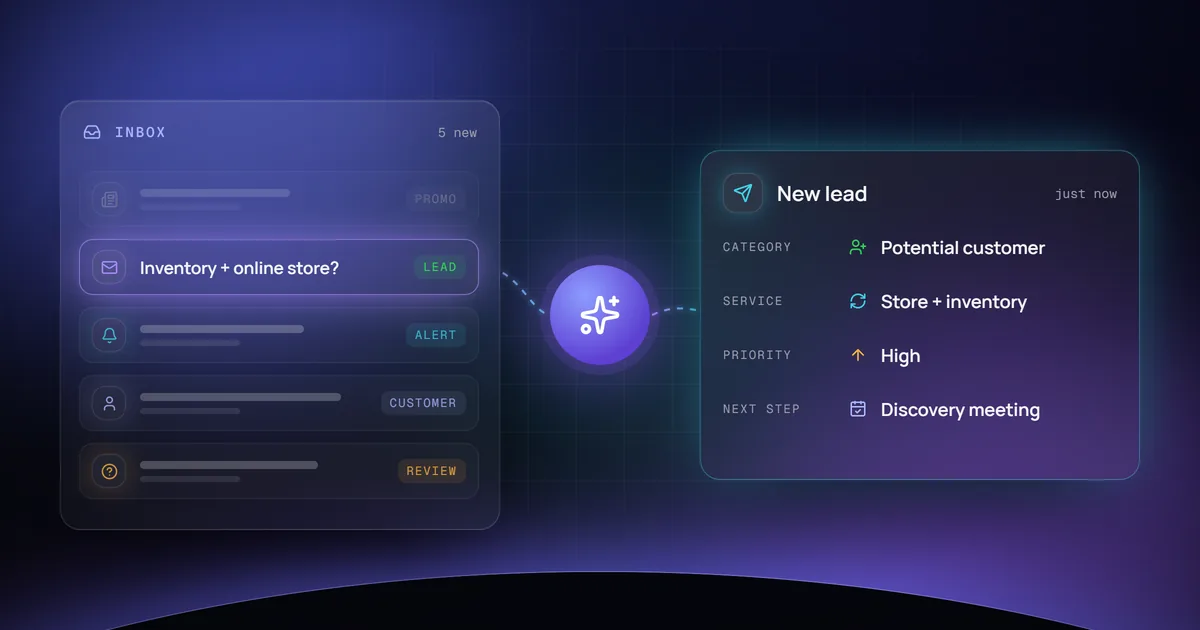
An AI email qualification system connects to an existing business inbox, reads each new message, and sorts it into potential customer leads, existing customer requests, operational alerts, promotional emails, or messages that need a person to look at them. When a message shows a real business need or buying intent, the owner gets a short summary and a suggested reply by Telegram, email, or in the CRM. Uncertain messages stay in the inbox instead of being discarded, and the system can run on a cloud server or locally.
Key takeaways
- The problem is not the number of emails. It is knowing which ones deserve your attention.
- AI reads the subject, content, and sender of each message and classifies it by purpose.
- Genuine opportunities trigger a short summary and a suggested next step, by Telegram, email, or CRM entry.
- Uncertain messages stay available for review rather than being automatically discarded.
- The same workflow can run on a cloud server or locally, depending on budget, security, and availability needs.
Your inbox should help you grow your business, not slow you down
Every day, business inboxes receive a mixture of customer inquiries, sales pitches, newsletters, platform notifications, and spam.
The challenge isn’t receiving emails. It’s knowing which ones actually deserve your attention.
What if an AI assistant could review incoming messages, identify potential customers, and notify you only when an important business opportunity arrives?
That’s the idea behind an AI-powered email qualification system.
How AI email automation works
Our approach connects an existing business email account to an automated workflow.
Step 1: Monitor incoming emails
The automation securely connects to an email account using a supported email integration, such as IMAP.
Step 2: Analyze each message
AI examines the email’s subject, content, and available sender information to identify its purpose.
Step 3: Classify the email
Messages are categorized into potential customer leads, existing customer requests, operational alerts, promotional emails, or messages requiring manual review.
Step 4: Prioritize genuine opportunities
AI evaluates whether a message contains a specific business need, a service request, or buying intent. Uncertain messages remain available for review rather than being automatically discarded.
Step 5: Notify the business owner
Important messages can trigger a Telegram notification, email alert, or CRM entry containing a concise summary and a suggested response.
Example: from incoming email to qualified lead
Imagine receiving this email:
“Hi, we’re looking for someone to connect our inventory management system with our online store. Can you help?”
Instead of allowing the message to get buried among promotional emails, the AI assistant identifies it as a potential business opportunity.
It generates a summary:
- Category: Potential customer
- Service: E-commerce and inventory integration
- Priority: High
- Suggested next step: Respond with a discovery meeting invitation
Meanwhile, ordinary newsletters and unrelated marketing emails remain in the inbox without interrupting the business owner.
Cloud or local: two ways to run the system
Businesses can deploy this automation on a cloud server, allowing it to run continuously without depending on an office computer.
Alternatively, the same workflow can run locally for testing, development, or situations where infrastructure control is preferred.
The right approach depends on the company’s budget, security requirements, technical resources, and availability needs.
Beyond email filtering
Once implemented, this automation can become part of a larger AI-powered business system.
Potential extensions include CRM lead creation, customer inquiry tracking, automated follow-up reminders, appointment scheduling, and sales pipeline reporting.
Rather than replacing human decisions, AI helps businesses focus their attention on the conversations that matter most.
Turn your inbox into a business opportunity engine
At MarketDyno, we focus on practical AI business automation that connects existing tools, reduces repetitive work, and helps companies improve operational efficiency.
From email qualification to CRM integrations and custom AI agents, we design solutions around real business workflows.
Want to explore AI automation for your business? Contact MarketDyno to discuss your existing workflow and discover what can be automated.
Implementation note: This article describes a proposed automation architecture and example workflow, not verified performance results or an already deployed customer system.
Frequently asked questions
Does the AI delete or hide emails?
No. The system classifies messages and notifies you about the important ones. Newsletters and unrelated marketing emails stay in the inbox, and messages the AI is unsure about remain available for manual review.
Which email accounts can it connect to?
It connects to an existing business email account through a supported email integration, such as IMAP, so you can keep using the email address and provider you already have.
Where does the automation run?
On a cloud server, so it runs continuously without depending on an office computer, or locally for testing, development, or when you prefer to control the infrastructure. The right choice depends on budget, security requirements, technical resources, and availability needs.