Where Is Your Business Losing Time and Money? How a Workflow Review Finds It
A practical guide to reviewing your business workflows: spot manual work, costly mistakes, and delays, then fix them with custom AI software.
The short answer
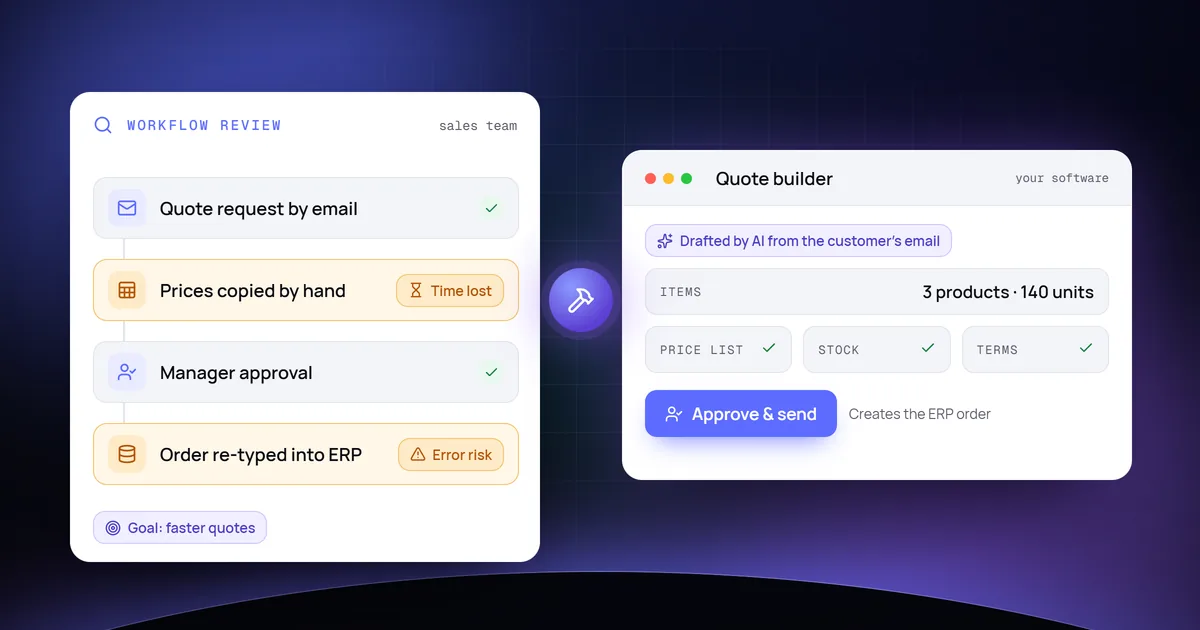
Most businesses lose time and money in their everyday workflows: data typed twice, small errors that turn into refunds and discounts, and requests that wait in inboxes. A workflow review finds these losses by following real work from start to finish, marking where it slows down or goes wrong, and ranking the fixes by value. Many fixes are simple, such as removing a step or connecting two systems. Where something is missing, custom software with AI built in can check data for errors, read documents and emails, and prepare work for people to approve, so the improved workflow runs every day.
Key takeaways
- Most losses hide in everyday workflows, not in big decisions.
- Watch for three signs: data typed twice, small mistakes that cost money, and work that waits.
- Follow real requests from start to finish. The written process and the real one are rarely the same.
- Rank the fixes by value and effort. Many need no new software at all.
- Where something is missing, custom software with AI built in can check, read, and prepare work for people to approve.
- Measure the result against the number you started with.
Ask a business owner where the company loses money, and they will usually point to big things: a lost customer, a bad hire, a slow season.
The bigger losses are often smaller and quieter. They happen every day, inside ordinary workflows: the way a quote gets prepared, an order gets entered, or an invoice gets checked. Each one costs a few minutes or a few dollars. Repeated hundreds of times a month, they add up to real money and hours your team could spend on better work.
The good news: these losses are easy to find once you know where to look.
Three signs your workflows are costing you
1. The same data is typed twice
A customer emails an order. Someone types it into the ERP. Someone else copies it into a spreadsheet for shipping, and again into the accounting system. Every copy takes time, and every copy is a chance for a typo, a wrong quantity, or a missed line.
If your team regularly copies information from one place to another, that workflow is a candidate for improvement.
2. Small mistakes keep costing money
A wrong price on an order. A discount applied to the wrong customer. An invoice that misses a delivery charge. Mistakes like these rarely look serious on their own, but they turn into refunds, credit notes, write-offs, and unhappy customers.
The tell-tale sign: the same kind of mistake keeps coming back, and someone has to catch it by hand.
3. Work waits
Requests sit in a shared inbox until someone notices them. Approvals wait for a manager who is out of the office. A quote takes two days because prices have to be looked up in three places. While work waits, customers wait too, and some of them go elsewhere.
How a workflow review works
A workflow review doesn’t need to be a long consulting project. For a small or mid-sized business, it can be short and practical:
- Choose the workflows that matter most. Start with those closest to customers and revenue: quotes, orders, invoicing, customer requests.
- Follow real work from start to finish. Pick a few recent requests and trace each one step by step. The written process and the real one are rarely the same.
- Map the people and systems involved. Who touches each request? Which tools, spreadsheets, and inboxes does it pass through?
- Mark the losses. Where is information copied? Where do mistakes happen? Where does work wait, and for how long?
- Rank the fixes by value and effort. Estimate what each problem costs in time or money, and fix the expensive, easy ones first.
The result is a short written plan: what to fix first, what to build, and how you will know it worked.
What the fixes usually look like
Not every fix needs new software. Often the biggest gains come from:
- Removing a step nobody needs anymore.
- Connecting two systems, so data flows automatically instead of being copied.
- Adding a simple rule, such as routing every request to the right person.
Where something is missing, custom software with AI built in closes the gap. AI is especially good at the work that used to need a person’s eyes:
- Reading emails, PDFs, and documents, and pulling out the information you need.
- Checking orders and invoices against price lists and customer terms, and flagging anything unusual.
- Preparing quotes, replies, and reports for a person to review and send.
People stay in control: AI prepares the work, and your team approves anything that reaches a customer, changes data, or spends money.
An example (an illustration, not a client story)
A distributor sometimes ships orders at the wrong price. Nobody notices until the customer disputes the invoice weeks later, and the difference usually ends up as a credit note.
A workflow review shows that prices are typed in by hand from a spreadsheet that isn’t always up to date. The fix is an order check: before an order is confirmed, the software compares it with the current price list and the customer’s terms. AI flags anything that doesn’t match, and the team fixes it in one screen before it becomes a loss.
A quick self-check
Answer these for one of your workflows:
- Is any information typed or copied by hand more than once?
- Does the same mistake keep coming back?
- Do requests or approvals wait for someone to notice them?
- Do people keep side spreadsheets because the main system doesn’t do what they need?
- Could you say what this workflow costs you each month in time or errors?
If you answered yes to any of the first four, or no to the last one, a workflow review will almost certainly pay for itself.
How MarketDyno can help
This is exactly what we do. We review your workflows with you and your team, find where time and money are lost, and build custom software with AI that fixes those steps, prevents costly mistakes, and adds real value to your business. See how our custom AI software service works, or get in touch to talk through one workflow that costs you time or money.
Frequently asked questions
What is a workflow review?
A step-by-step look at how work really moves through your business: who does what, which systems are involved, where information is copied, and where work waits or goes wrong. The result is a short list of improvements, ranked by how much time and money each one saves.
Which workflows should we review first?
Start with the ones closest to revenue and customers, such as quotes, orders, invoicing, and customer requests. They run every day, involve several people, and small problems in them turn directly into lost money.
Do we need AI to fix our workflows?
Not always. Some fixes are a simple rule, a template, or a connection between two systems. AI is worth it where the work involves reading, checking, or writing, such as messy emails, documents, and orders that need to be checked against prices and terms.
Do we have to replace the software we already use?
Usually not. Most improvements are built on top of your existing systems, adding only the piece that is missing so your team keeps working in the tools they know.